In the group sites, the pages you see are called "posts".
Procedure 6.2. Adding a Page
Go to the Group Site main page.
Click the "Page" link in the "Add Content" menu on the left.
Fill in the form. The fields marked with an asterisk are required.
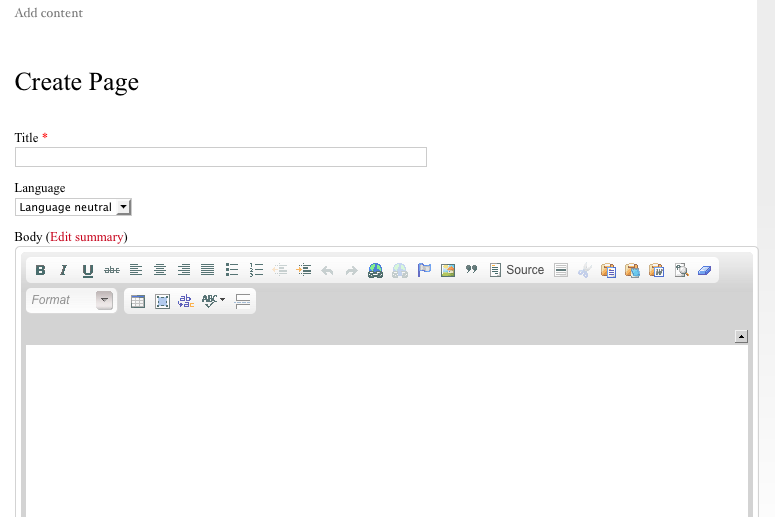
The "Language" field should be set to "Language neutral" if you want that content to be visible regardless of which language the visitor is using. Any content marked as "English" will only be shown on the English interface, and content marked as Japanese will only be shown in the Japanese interface. Content marked "Language neutral" will always be visible, regardless of interface.
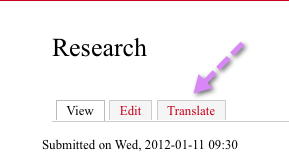
In order to create bilingual content, first create the page as language=English. After setting the page to one of these languages and saving, a "Translate" tab will appear in the Tab Menu for that page.
Click the "Translate" tab in the Tab Menu.
Click the "Add Translation" link.
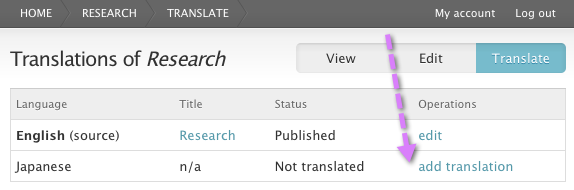
Fill in the form. You will notice that the content of the original English. Fields like "Language", "Groups audience", and "Group content visibility" are grayed out because this new node is linked to the first one as its translation, so you are not allowed to alter these fields.