- Administrative Member
The administrative member has control over the pages, membership, menus, and other aspects of the Group Site. However, unlike the Site Administrator, the Administrative member of a group has no control over the contents of other Group Sites.
- Book
A Book is a Node which serves at the main connection point for a set of nodes called Book Pages, which are ordered and linked to one another like the pages of a physical, paper book.
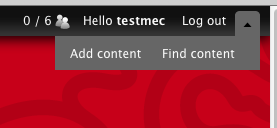
- The Black Toolbar at the Top of the Screen
Some users will have a black toolbar across the top of the screen. By clicking the triangle on the far right, you can access menus to create new content and search content already in the system.
- Book Page
Book Pages are nodes which are associated with a Book and linked to one another in a certain order, like the pages of a physical, paper book.
- Group Menu
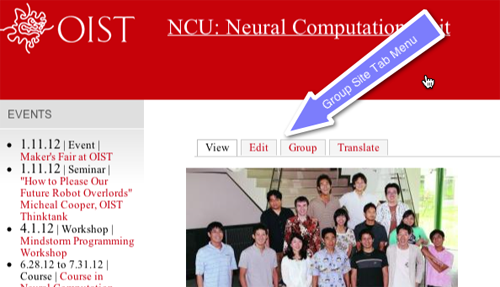
The Administrator User sees a Tab Menu on each node, but on the Group Node there is an additional tab labeled "Group".
The "Group Menu" opens a menu to other group-site-wide menus for managing People, Content, Menus, and Blocks.
- Group Node
What looks like the Home Page of the groups website is a special node called the "Group Node" because it is the core of the group website. All other nodes in that website are associated to this Group Node.
The Administrator Member sees the Tab Menu on each node in the site, but only on the Group Node can you find the link to the Group Menu.
- Group Site
Each Group Site is a website inside a larger website, which is an installation of Drupal. The "Site" in this manual is the larger Drupal in which the groups have been created.
- Node
This system runs on the open source CMS Drupal. In Drupal, almost every chunk of content is a node, so each new Page or Event you create is a node. A node is a piece of content you see in the web system.
- Node ID
Every node has a node ID, which is often abbreviated "nid".
- Parent Book Page
The Book Page nodes in a Book are linked hierarchically. The Parent of each Book Page node is the Book node, and each level down in the hierarchy is the child of the parent above it, so 23.1 is the parent of 23.1.2, etc.
- Role
Each user is given one or more roles, and each role has a set of permissions and access privileges. The roles you have been given determines what you can see and do in the site.
- Site Administrator
The administrator of the larger website inside of which each Group Site exists. The Site Administrator can create new groups, assign group members, and assign administrative members for groups.
- Tab Menu
The menu specific to a node. In the case of a Group Site's main page, this is the main menu for managing the group. The Tab Menu is only visible to administrative members.
- WYSIWYG Editor
The OIST website system is using the WYSIWYG CKEditor. WYSIWYG means "what you see is what you get", a name for an in-browser editor which allows you to modify your page without reading HTML, by using the menus to change the look of the page and see it as it changes.
Learn more about how to use the CKEditor at the CKEditor Docs Site.